Microsoft Teams App
The Bridges App uses the Microsoft Graph API to automatically create and manage Microsoft Teams meetings for incidents. When an incident bridge is created, the App creates a corresponding Microsoft Teams online meeting and stores the meeting details within the incident runbook.
Key capabilities include:
- Automatic creation of Microsoft Teams meeting bridges.
- Support for multiple bridge meetings per incident.
- Designation of a primary meeting bridge.
Microsoft APIs Used
The App uses Microsoft Graph API v1.0, including:
- POST /v1.0/me/onlineMeetings – Create Teams online meetings.
- POST /v1.0/teams/{team-id}/channels/{channel-id}/messages – Post messages to Teams channels.
- POST /v1.0/chats/{chat-id}/messages – Post messages to Teams chats.
Prerequisites
To set up the app, a Cutover engineer will collaborate with you, and you will need to provide the following:
- Create a Microsoft Entra ID (Azure AD) application registration.
- Grant the required Microsoft Graph permissions.
- User.Read
- Chat.ReadWrite
- ChatMessage.Send
- ChannelMessage.Send
- OnlineMeetings.ReadWrite
- Calendars.ReadWrite
- offline_access
- Configure either a Client Secret or an X.509 Certificate for authentication.
- Register a Redirect URI for OAuth authentication.
- Authorize a Microsoft Teams user account that will create meetings and send notifications.
The authorized account must:
- Have a valid Microsoft Teams licence.
- Be able to create Teams meetings.
- Have access to the target Team and Channel used for notifications.
Supported Authentication
The App supports OAuth 2.0 Authorization Code Flow with Refresh Tokens and Microsoft Graph delegated permissions.
Supported authentication methods:
- Client Secret Authentication
- Certificate-Based Authentication (X.509 Certificate)
All Teams meetings and notifications are created using the authorized Microsoft Teams user account associated with the integration.
Test the Bridges App
1.When an incident is created, the Microsoft Teams bridge will appear in the Bridges app. If multiple Microsoft Teams meetings are associated with the incident, one of them can be designated as the primary bridge as shown below:
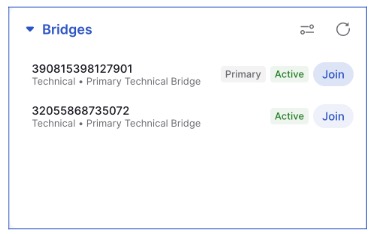
2.Simply click Join to enter the Microsoft Teams bridge.
