System Parameters
System parameters give you a secure, centralized way to manage shared configuration across integrations, automations, and dynamic fields—no hardcoding required. They reduce duplication, protect sensitive values like API keys or tokens, and make updates simple by applying changes in a single place.
At a high level, system parameters:
- Store shared values such as API keys, tokens, URLs, and environment-specific settings
- Can be reused across integrations, automations, and runbooks
- Prevent sensitive values from being embedded directly in payloads
- Are injected dynamically at runtime using dynamic field references
- Are stable, best suited to values that do not change per task or per execution
When to use system parameters
Use system parameters for:
- API keys or authentication tokens
- Base URLs for external services (dev, test, prod)
- Shared headers or configuration values used by multiple integrations
- Credentials or secrets that should not be editable at the task level
When not to use system parameters
System parameters are not recommended for:
- Values that change per task or per runbook execution
- Short-lived or execution-specific credentials
- Values operators need to edit during the execution
Add a system parameter
To add a system parameter you will need the Integrations Admin role.
- In the Cutover platform, click the settings cog on the bottom left corner.
- Select System Parameters.
- Any system parameters previously created will be listed.

- Click Add new parameter.
- The Create a new System Parameter modal window displays.
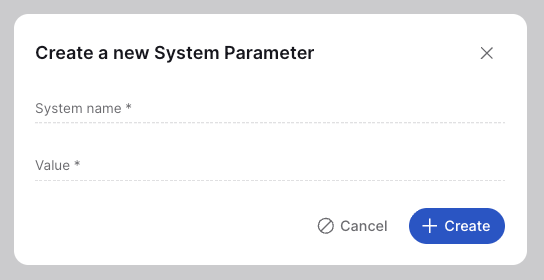
- URL example:
System name (for example: api_base_url, servicenow_token)
Value (for example: https://api.example.com)
Token example:
System name: service_api_token
Value: eyJhbGciOiJIUzI1NiIsInR5cCI6IkpXVCJ9...
- Click + Create
- The parameter is now available for use in integrations and automations.
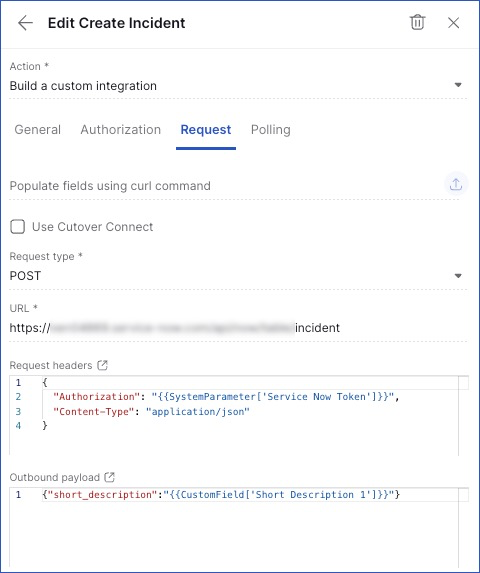
Edit a System Parameter
To edit a system parameter, return to the System Parameters list by selecting Settings (cog) and choosing System Parameters.
Select a system parameter from the list to open the edit panel on the right-hand side of the screen. From here, you can update:
- The Display name
- The Value
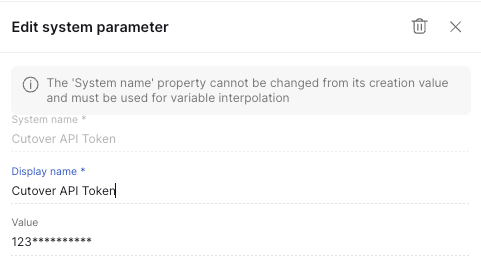
When finished, click Save to apply your changes or Discard to revert them.
To delete a system parameter, select the bin icon in the top-right corner of the edit panel.
How system parameters work
System parameters are defined once and referenced using dynamic field markup wherever dynamic fields are supported (e.g., integrations, automations, and task fields).
When an integration or automation executes:
- Cutover resolves the dynamic field reference
- The stored system parameter value is injected at runtime
- The integration or automation runs using the resolved value
This allows you to update values centrally (e.g., rotating API keys or changing environment URLs) without modifying each integration.
Example: Base URL reference
Instead of hard-coding a base URL:
https://api.example.com/v1
Reference a system parameter:
{{system.api_base_url}}
Example: Authorization header
POST /v1/tickets HTTP/1.1
Host: {{system.api_host}}
Authorization: Bearer {{system.api_token}}
X-Custom-Header: {{system.custom_value}}
Content-Type: application/json
{
  "ticket_name": "Issue with server",
  "priority": "high"
}
Using system parameters in dynamic fields
System parameters are referenced exactly like other dynamic fields. The basic syntax is:
{{system.<parameter_name>}}
systemis the namespace indicating this is a system parameter.<parameter_name>is the name of the system parameter you defined.
Examples:
- Base URL
https://{{system.api_base_url}}/v1/users
This dynamically injects the value of api_base_url at runtime.
- Authorization header
Authorization: Bearer {{system.service_api_token}}
The API token stored as a system parameter is inserted securely when the integration or automation executes.
- Combining multiple system parameters
{
  "url": "https://{{system.api_base_url}}/v1/data",
  "auth": "Bearer {{system.service_api_token}}",
  "env": "{{system.environment}}"
}
You can reference as many system parameters as you need within payloads, headers, or custom fields.
Note: If a custom field (CF) type is configured with the Temporary credentials type, system parameters must be used instead. Temporary credentials are not supported in this context and will not resolve correctly. Referencing system parameters ensures credentials are handled securely and reliably.
For more information, see the Use dynamic fields article.
Summary
System parameters provide a secure, scalable way to manage shared configuration in Cutover. By centralizing reusable and sensitive values, they reduce duplication, improve security, and make integrations easier to maintain and update.
