Integration Security Best Practices
This guide explains how to securely configure integrations between Cutover and third-party services, and how to apply the principle of least privilege when runbook tasks trigger actions in external systems.
GitHub is used as the primary example, covering common integration scenarios such as triggering GitHub Actions workflows, creating branches, opening pull requests, and creating releases. The same principles and recommendations apply to other supported integrations and external platforms, including ServiceNow, Jenkins, and Ansible/AWX.
The guide builds on existing least-privilege principles already used within Cutover, including identity, scope, lifetime, and enforcement, as well as the distinction between tool-managed and source-managed permissions. While these concepts have been explored in the context of AI agents, the framework applies equally to any system that acts on a user's behalf against a third-party API. Cutover is exactly that kind of system, making these principles directly relevant to how access and permissions should be designed and governed.
The question behind this guide:
A common question when integrating orchestration platforms with external systems is:
How do you ensure that only authorised users, teams, or service accounts can trigger privileged actions, and prevent unauthorised or unintended activity?
This guide explains the security principles, controls, and implementation approaches that can be used to govern access to integrated systems. It provides a repeatable framework for evaluating and designing secure integrations, helping organisations understand how permissions are enforced and how privileged actions can be appropriately restricted.
Two distinct risks, two control planes
Customer concerns around integration security typically involve two distinct questions. Keeping an integration secure requires addressing both, as they are controlled in different parts of the system and should be considered separately.
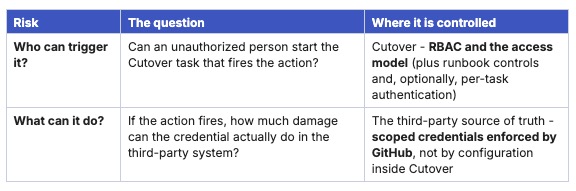
A secure design requires both controls to be in place. Strong RBAC combined with an over-privileged token still leaves a large impact if something goes wrong. Similarly, a tightly scoped token combined with weak RBAC can still allow the wrong user to trigger actions they should not have access to.The following sections explain each control in more detail and how they work together as part of a practical configuration approach.
The least-privilege framework
When a system is described as “having access” to another system, that statement actually hides several important design decisions. Two integrations that are both described as “having access to GitHub” can have very different security profiles depending on how these decisions are made. There are four key decisions that define this access:
- Identity - whose account is acting? A named person, a shared account, or a dedicated non-human (service) account?
- Scope - what is that identity allowed to do? Every repository or one? Read-only or read-write? Which specific actions?
- Lifetime - how long is the credential valid before it expires or rotates? Indefinite, or minutes?
- Enforcement point - where is the limit actually checked? At the source-of-truth identity provider (GitHub), or only in the configuration of the tool calling it (Cutover)?
Credential types and security considerations
There are several common patterns used to authenticate integrations with third-party systems. These patterns vary in how secure they are, particularly when used in automated workflows that act on behalf of users or systems.
Each approach has its place, but they differ in how well they support least-privilege principles such as limited access, controlled scope, and reduced risk if credentials are exposed.
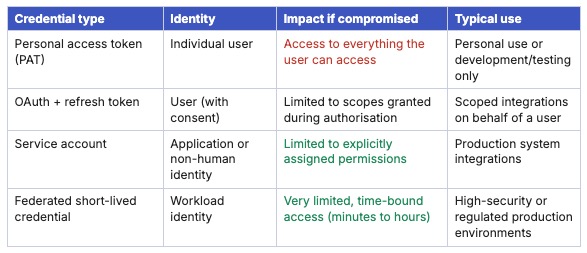
The architectural choice: where do permissions live?
There are two fundamentally different places the boundary can be enforced. The first is inside the calling tool (Cutover). The second is inside the system being called (GitHub).
This distinction is important because both designs may appear to be similar. In both cases, the integration can be configured to perform a limited action. The difference is where that limit is actually enforced.
Pattern A — Tool-managed permissions
In this pattern, the GitHub integration holds a broad credential, but the calling tool (Cutover) is configured to use it in a limited way. When we talk about a broad credential we mean it can access more resources or perform more actions than this specific GitHub workflow requires. For example, the credential may be able to access every GitHub repository, but the calling tool configuration says "only use this repository" or "only run this action".
This can be useful as an operational control, but it is not the strongest security boundary. GitHub still sees a credential with more permissions than the workflow needs. Problems can occur if the calling tool is misconfigured or compromised.
Pattern B — Source-managed permissions
In this pattern, permissions are defined and enforced in the system being called - GitHub. For example, the credential issued by GitHub is scoped to one repository, and only the permissions required for the integration. If a malicious request is attempted outside that scope, GitHub rejects it. In this model, GitHub enforces what the credential is allowed to do.
Permissions are defined and enforced directly by the external system. For example, a GitHub App or fine-grained personal access token can be restricted to a specific repository and a minimal set of permissions. Because the credential itself is limited, the external system enforces the security boundary. If the integration attempts an action outside its authorised scope, the request is rejected regardless of how the integration is configured. This approach provides a stronger security model because permissions are enforced at the source and can be independently audited.
Why this matters here: When customers ask, "What happens if a task is triggered incorrectly?" the answer depends largely on where permissions are enforced. With source-managed permissions, the impact is limited by the scope of the credential itself. Even if a task is triggered unexpectedly, the integration can only perform the actions that have been explicitly authorised in the external system. It cannot access additional repositories, workflows, or resources beyond that defined scope. This is a key principle of least privilege: security boundaries should be enforced by the system that owns the resource, not solely by the tool interacting with it.
Defence in depth: five layers
Least privilege is necessary but not sufficient. The full model has five layers; any one can fail and the system stays safe if the others hold.
- Identity - whose credential is this?
- Scope - what can that identity do?
- Time - how long is the credential good for? Rotate aggressively; prefer short-lived tokens.
- Network - where can the agent reach? Egress controls, private connectivity, allow-listed destinations.
- Audit - can you prove what happened, distinct from human activity?
Mapping the framework to Cutover and GitHub
How Cutover triggers a third-party action
Cutover orchestrates and governs; the third-party system executes. A runbook task is configured as an integration action that, when started, makes an API call to the external service and tracks the result. There are two broad ways to make that call:
- Direct from Cutover - Cutover calls the third-party API directly (predefined integrations such as the built-in GitHub connector, or a Custom Integration). This requires Cutover to reach the service and the service's credentials to be held in Cutover.
- Via Cutover Connect - Cutover Connect is installed inside the customer's network and makes the outbound call locally. Cutover will never need inbound access to the third-party platform, and the platform is never exposed externally. This is the most secure connection a client gets to their Cutover VPC from their network: it automates exactly what a human operator would do, and only what it has been told to do.
Credential options Cutover gives you
When configuring a Custom Integration in Cutover, you can choose from several authentication methods. The most appropriate option depends on the target system and your organization's security requirements.

GitHub integrations
When integrating with GitHub, consider using one of the following authentication methods:
- Fine-grained Personal Access Tokens (PATs), scoped to specific repositories and permissions.
- GitHub App installation tokens, which provide a dedicated, non-human identity with repository-specific permissions and short-lived credentials.
Both approaches allow access to be limited to only the repositories and actions required by the integration. If you are using the predefined GitHub connector, ensure the token supplied to the connector is scoped appropriately, as the permissions granted to that token define the access available to the integration.
Note on the predefined GitHub connector: Cutover includes a predefined GitHub connector that supports common GitHub actions, including Create Branch, Create Pull Request, and Create Release. The connector operates as a cloud-to-cloud integration and requires the Integrations Admin role to configure. Authentication is provided using a GitHub authorization token. To help maintain security, ensure the token is scoped only to the repositories and permissions required by the integration. If you need to trigger a GitHub Actions workflow using the workflow_dispatch event, you can achieve this using a Custom Integration. As with any GitHub integration, we recommend following the principle of least privilege by granting only the permissions necessary for the intended actions and carefully controlling who can configure or execute integration tasks.
Pattern A vs Pattern B, in Cutover terms
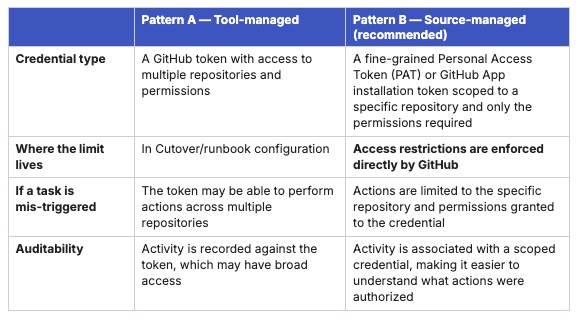
Recommendation
Where possible, use repository-scoped credentials with the minimum permissions required for the integration. This approach helps reduce risk, improves auditability, and aligns with the principle of least privilege.
Control plane A - who is allowed to trigger the task
How do we stop a bad actor from clicking a task that initiates a destructive request? The answer is layered, and every layer lives in Cutover.
RBAC and the access model
Cutover's primary control over who can do what is role-based access control. Access is granted at several levels, so a user only sees and acts on what their role permits:
- Global user admin — manages all users and roles; access to the Access Management area.
- Workspace stakeholder / member — a stakeholder can view a workspace; a member has the least permissions and can only act on tasks they are assigned.
- Folder runbook creator / stakeholder — scoped to runbooks within a folder.
- Stream editor — manages tasks within their stream only.
- Team members — can access specific runbooks and action only the tasks they have been assigned.
- Integrations Admin — required to create and configure integration connections (including GitHub). As this role can configure access to external systems, it should be assigned only to users who require integration administration privileges.
Used deliberately, this model means a privileged GitHub task can be assigned so that only a specific, named set of users - or a single stream owner - is able to start it. Anyone else either cannot see the runbook containing the task or cannot action it.
Where SAML/SSO is configured, roles can be auto-mapped from the customer's identity provider (e.g. Okta), so Cutover access stays aligned with the corporate joiners/movers/leavers processes rather than being managed separately.
Runbook-level controls
Beyond role assignment, the runbook structure itself constrains when and how a task can fire:
- Predecessors and sequencing - a destructive task can be gated behind predecessor tasks (including a manual approval/sign-off task) so it cannot start out of order.
- Manual vs auto start - leaving Auto start off means the integration only fires on a deliberate human action, never automatically on predecessor completion.
- Fixed start time - a task can be restricted so it is only startable at an approved day and time.
- Rehearsal mode - runbooks can be rehearsed; tasks only execute against the real system when explicitly allowed to run outside rehearsal.
- Full audit trail - every task start is attributed to a user with a timestamp, giving an immutable record of who triggered what.
When RBAC is not enough: per-task authentication
When you want the user to re-authenticate at the point of starting a privileged task. Cutover supports this today through OAuth at the task level: when an integration uses OAuth and no functional user is configured, the operator must authenticate with the third-party provider in the task panel before the call is made. This binds the action to a freshly proven identity and that provider's own access policy (MFA, conditional access, etc.).
Control plane B - controlling what an integration can do
While Control Plane A focuses on who can configure or execute an integration, Control Plane B focuses on what the integration itself is allowed to do.
Applying least-privilege principles means ensuring credentials are granted only the access required for their intended purpose. Wherever possible, these restrictions should be enforced by the target system, not solely through runbook configuration.
Scope the GitHub credential at source
When integrating with GitHub, we recommend using a GitHub App or a fine-grained Personal Access Token (PAT) rather than a broadly scoped token. Grant access only to:
- The repositories required by the integration.
- The permissions needed for the intended action.
For example:
- Grant workflow permissions when triggering GitHub Actions workflows.
- Grant repository write permissions only when creating branches, pull requests, or releases.
Prefer non-human identities
Where possible, use service-based credentials rather than credentials associated with individual users. A GitHub App provides a dedicated identity for the integration and uses short-lived installation tokens, helping reduce reliance on long-lived credentials.
Use dedicated credentials for individual workflows
Avoid using a single credential for multiple unrelated workflows. Instead, consider creating separate credentials with narrowly scoped permissions for each workflow or integration. This limits the impact of credential misuse and makes access easier to manage and audit.
Layer security controls
The strongest security posture combines controls across multiple systems. For example:
- Cutover role-based access control (RBAC) determines who can configure or execute integration tasks.
- GitHub permissions and environment protection rules determine whether the requested action is permitted.
Using controls in both systems helps reduce risk and provides additional safeguards for critical workflows.
Cutover RBAC controls who can execute an integration task (Control Plane A), while GitHub permissions and environment protection rules control what actions the workflow is allowed to perform (Control Plane B). Applying controls in both systems provides layered security and helps ensure integrations operate within defined boundaries.
Credential Lifetime, Network Controls, and Auditability
Credential lifetime
Where possible, use short-lived credentials rather than long-lived tokens. Short-lived credentials reduce the impact of credential exposure and help limit access over time. For example, GitHub App installation tokens are automatically generated and expire after a short period, whereas Personal Access Tokens (PATs) typically remain valid until revoked or expired. We recommend:
- Using short-lived credentials where supported.
- Storing secrets securely in a secrets management solution.
- Regularly reviewing and rotating credentials in accordance with your organization's security policies.
Network controls
When using Cutover Connect, integration traffic can be routed through your organization's network rather than exposing internal systems directly to the internet. This approach can help:
- Keep integration traffic within your network boundaries.
- Reduce exposure of internal systems.
- Restrict outbound communication to approved destinations, such as GitHub endpoints.
Auditability
Ensure that both Cutover and the integrated platform maintain appropriate audit logs. Combining audit information from both systems can help teams understand who initiated an action, when it occurred, and what changes were made.
Worked example: triggering a GitHub Action from a runbook
This example brings together both control planes in practice: a runbook task that triggers a GitHub Actions workflow, including workflows that may have significant impact.
The naive setup (Pattern A — avoid)
A common but risky approach is to:
1. Create a GitHub integration using a broadly scoped Personal Access Token (PAT) that can access multiple repositories.
2. Configure a task to dispatch a GitHub Actions workflow with Auto start enabled.
3. Rely on procedural guidance (for example, “only the release team should run this”) to control usage.
In this model, the restriction is effectively informational rather than enforced. If the token has broad access, it can potentially act across any repository it is permitted to reach, and execution depends on convention rather than technical controls.
The least-privilege setup (Pattern B — recommended)
A more secure approach applies layered controls across Cutover and GitHub.
1. Identity and scope (GitHub):
Use a GitHub App or fine-grained Personal Access Token (PAT) scoped to:
- A single repository.
- Only the permissions required (for example, `Actions: write` to dispatch workflows)
This ensures the credential is limited to the minimum required access.
2. Connectivity (Cutover Connect):
Use Cutover Connect to route integration traffic through the customer’s network environment. This helps ensure internal systems are not directly exposed and outbound communication can be restricted to approved endpoints such as GitHub.
3. Who can trigger the action (Cutover RBAC)
In Cutover:
- Assign the task only to approved release users or groups A*
- Disable Auto start
- Require a predecessor approval task before execution. This ensures only authorised users can initiate the workflow within Cutover.
4. Optional step-up authentication:
Where additional assurance is required, task-level authentication can be used so the user re-authenticates at execution time, potentially with MFA enforced by the identity provider.
5. Auditability:
Cutover records who initiated the task and when GitHub records the workflow dispatch event and any associated approvals. Together, these logs provide end-to-end traceability across both systems.
Outcome: If a task is triggered incorrectly or by an unauthorised user, multiple independent controls must still be satisfied:Cutover RBAC must permit task executionAny required approval steps must be completedGitHub must accept the request within the constraints of the scoped credential and environment rulesEven in a failure scenario, the integration is limited to a single repository and a narrowly defined action. There is no pathway for broad or unintended access across GitHub.This is least privilege applied through defence in depth across both Cutover and GitHub.
Discovery questions for customers
A key principle in secure integration design is understanding how access is controlled today before mapping it to Cutover. Rather than assuming a specific security model, start by exploring the controls already in place within the customer’s environment.
A useful starting question is:
What controls do you currently have in place to prevent an unauthorised user from initiating this action, and how is that enforced outside of Cutover?
The answer helps establish the appropriate security baseline and informs how Cutover should be configured within that model.
Follow-up questions:
Depending on the response, the following questions can help further clarify the control environment:
- Who is authorised to trigger this action today, and how is that access enforced (for example, role-based access, approvals, or tooling)?
- Does this action require a second-person approval, and where is that enforced — in a change management process, in GitHub, or elsewhere?
- Is step-up authentication (such as MFA) required at the point of executing a privileged action?
- What level of exposure is acceptable if a credential is compromised (for example, a single repository versus multiple systems)?
- Are your GitHub or automation systems publicly accessible, or must all requests originate from within your network (for example, via Cutover Connect)?
- What evidence do auditors require to demonstrate that access controls are enforced, not just configured?
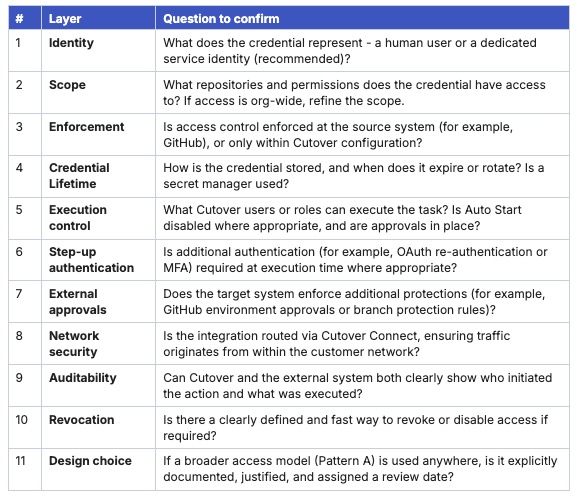
Pre-deployment checklist
Use this checklist before connecting any Cutover integration to a production third-party system. If any item cannot be confidently answered, the integration should not be considered production-ready.
Key takeaways
When designing integrations between Cutover and third-party systems, following least-privilege principles helps reduce risk, improve auditability, and ensure actions are performed only by authorised users and services.
- Separate “who” from “what”
Control who can trigger an action using Cutover RBAC, and control what the integration can do using scoped credentials in the target system (for example, GitHub). Both must be secured independently. - Enforce boundaries at the source
Prefer a source-controlled approach (Pattern B), where permissions are defined in the external system. This ensures that even if a task is triggered incorrectly, the impact is limited by the credential’s scope. Configuration within Cutover should not be treated as the only security boundary. - Use Cutover Connect as the secure execution path
Cutover Connect routes integration traffic from within the customer’s network, avoiding inbound exposure of internal systems. It only executes the actions it is configured for, and provides clear attribution for every request.
References and further reading
Cutover documentation:
- Integrate with GitHub — Cutover Help Center
- Custom Integrations — Cutover Help Center
- Create an integration: Authorization settings — Developer Portal
- Create an integration: General settings — Developer Portal
- Role types and permissions — Cutover Help Center
- Upload mappings for RBAC — Cutover Help Center
- Cutover Connect — Developer Portal
External references and standards:
- GitHub security documentation:Fine-grained personal access tokens, GitHub Apps, and Actions environment protection rules
- OAuth 2.0 (RFC 6749 / RFC 6750)NIST SP 800-207: Zero Trust Architecture
